
Multiply
Open a leveraged position in one transaction, choose your own leverage, and compare it with the managed Auto vault.
What Multiply does
Multiply builds a looped position for you. It supplies a yield-bearing asset as collateral, borrows a closely related asset against it and supplies again, all in one transaction. You choose the leverage, and you can change it or close the position whenever you want.
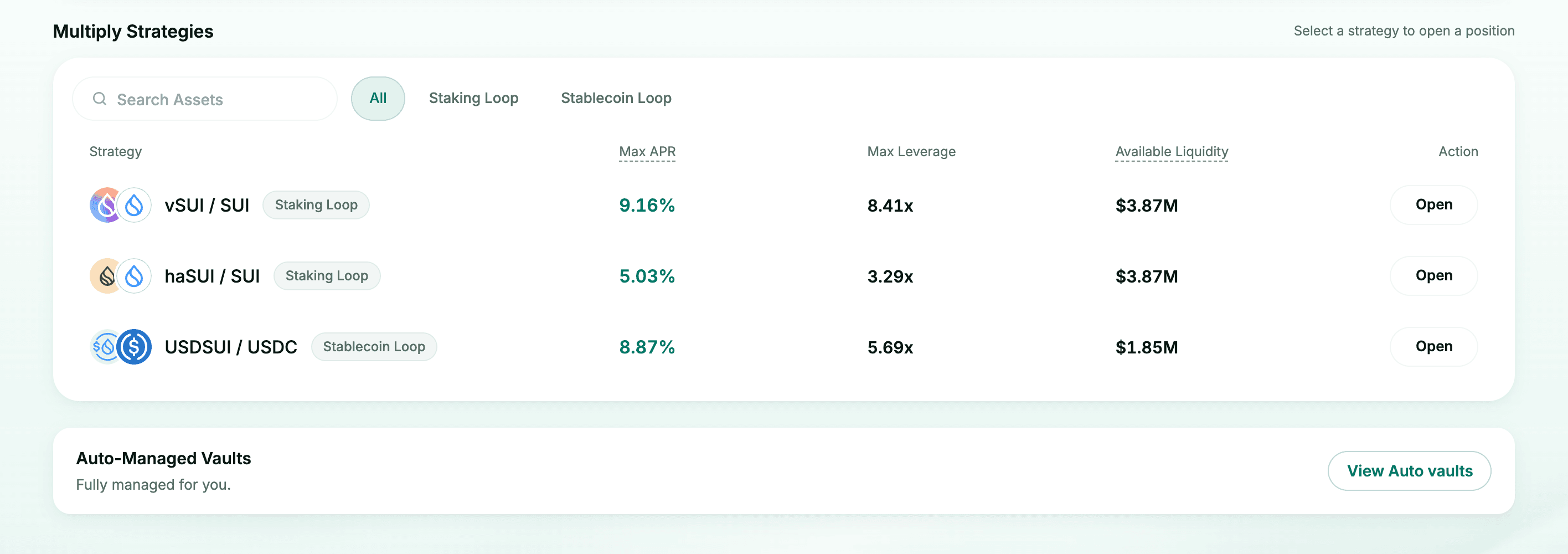
Each strategy is a pair written as collateral / debt.
| Strategy type | Pairs | What the position holds |
|---|---|---|
| Staking Loop | vSUI / SUI, haSUI / SUI | Liquid-staked SUI as collateral and SUI as debt. Leverage multiplies the staking yield while your exposure to the SUI price stays the same. |
| Stablecoin Loop | USDSUI / USDC | USDSUI as collateral and USDC as debt. Leverage multiplies the spread between the USDSUI supply rate and the USDC borrow rate. |
The positions sit in NAVI's main market, so they follow the same Health Factor and liquidation rules as any other loan.
Manual or Auto?
The strategies on the Multiply page are Manual: you set the leverage and manage the position yourself. Auto-Managed Vaults run the same kind of loop inside an Earn vault, where a keeper sets the leverage.
| What to compare | Manual (Multiply) | Auto vault (Earn) |
|---|---|---|
| Who sets leverage | You choose it when you open and can adjust it later. | The vault adjusts it for all depositors. Auto does not mean lower risk. |
| What you hold | Your own collateral and debt in the main market, with your own Health Factor. | Shares in the vault. The page shows the vault's current leverage. |
| Getting out | Instant. Convert and Repay closes the position in one transaction. | A withdrawal request that settles on the vault's schedule. |
| Fees | Listed under Transaction Fees before you sign. | Any performance or withdrawal fee is shown on the vault's page. |
To use the managed version, select View Auto vaults on the Multiply page or follow Multiply in High Yield Vault.
What will it cost?
Transaction Fees in the form adds up what the transaction charges, and its breakdown lists each part.
| Fee | When it applies |
|---|---|
| Flash Loan Fee | Multiply uses a flash loan to build or unwind the loop in one transaction. |
| Borrow Fee | Charged on new debt at the main market's rate. A waived fee appears struck through. |
| Stake, Unstake or Swap Fee | Charged by the route that converts between your deposit and the collateral, such as Volo, Haedal or Astros. |
Sui gas is separate and is estimated when you confirm. After that, borrowing costs interest at a variable APR. If the borrow rate rises above the collateral's yield, the position's net APR turns negative.
Manage your position
- Open a position and check its leverage, APR and Health Factor before signing.
- Add funds, adjust leverage or close.
- Get an email before the Health Factor gets low.