
Open a position
Pick a Multiply strategy, set your leverage, and check the APR, Health Factor and fees before you sign.
Before you start
Connect your wallet on the Multiply page. Hold the strategy's deposit asset, SUI for the staking loops or USDC for USDSUI / USDC, and keep some SUI for gas. Compare Manual and Auto if you have not decided which to use.
Open a position
Choose a strategy
Filter the list by Staking Loop or Stablecoin Loop, or search for an asset. Each row shows the strategy's maximum APR, maximum leverage and available liquidity. Open a row to see its Multiply Overview.
| On the strategy page | What it tells you |
|---|---|
| Supply APR and Borrow APR | What the collateral earns and what the debt costs right now. The gap between them is what leverage multiplies. |
| Available Liquidity | How much of the debt asset can still be borrowed. Every new position draws on it, and the borrow rate rises as it fills. |
| Max Borrow LTV and Liquidation LTV | The share of collateral value you can borrow, and the share at which the position can be liquidated. |
| Net APR History | A reference curve at each leverage, recalculated from past pool rates. It is not a record of realized returns. |
Select View Risks to see how you exit and what can go wrong.
Enter an amount and set leverage
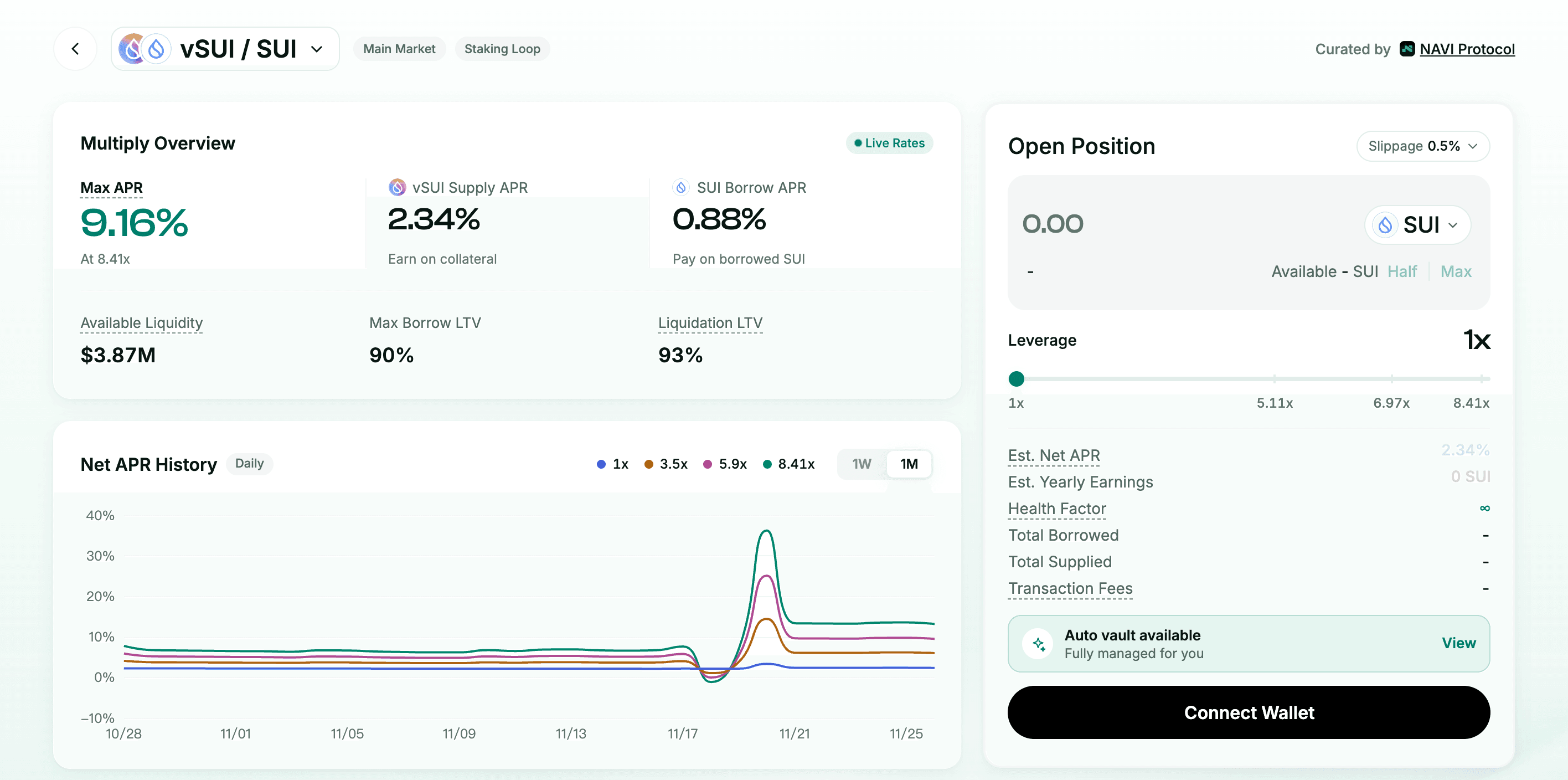
In Open Position, enter how much to deposit. The form shows a minimum when the strategy has one. Drag Leverage anywhere between 1x and the strategy's maximum. The marks on the scale are preset levels.
Review the position
The form updates as you move the slider.
- Est. Net APR and Est. Yearly Earnings show the return on your deposit at current rates, before transaction fees.
- Health Factor shows how close the position starts to liquidation.
- Total Supplied and Total Borrowed show both legs of the loop.
- Transaction Fees lists the fees for this transaction.
The form warns you if the borrow cost exceeds the yield at this leverage, or if the pool cannot lend the amount you need. Lower the leverage or the amount until the warning clears.
Slippage limits how far the conversion into collateral can move from the quote. If the price moves further than that, the transaction fails and nothing is opened.
Confirm and verify
Select Confirm. The app fetches a final quote, simulates the transaction and then asks your wallet to sign. One transaction converts your deposit, supplies the collateral and borrows the debt.
After it settles, Your Position on the strategy page shows the deposit, leverage, Health Factor, collateral and debt. The position also appears in Portfolio.
How leverage shapes the position
Take a deposit worth dollars opened at leverage .
Health Factor and liquidation buffer
With the strategy's Liquidation LTV written as , the starting Health Factor is
The position can be liquidated when falls below 1. The liquidation buffer is how far the collateral can fall against the debt before that happens.
Maximum leverage
Two limits apply, and the lower one wins. Max Borrow LTV caps borrowing, and every transaction must leave the Health Factor at a minimum, 1.05 for the current strategies.
The slider stops slightly below this, because it also reserves room for your slippage setting.
Net APR
For vSUI and haSUI, the app measures your equity at the token's redemption value, while the slider's leverage uses oracle prices. The Est. Net APR it shows is lower than this formula gives at the same slider setting, so rely on the figure in the form.
Example. You deposit 1,000 USDC into a stablecoin loop at 4x. The pair has an 87% Liquidation LTV, the collateral earns 6.5% and the debt costs 6%.
| Calculation | Result |
|---|---|
| Collateral | USD |
| Debt | USD |
| Health Factor | |
| Liquidation buffer | |
| Net APR |
At these rates the position earns about 80 USDC a year on the 1,000 USDC deposit. If the borrow rate rose to 9%, the same position would earn .